Server Room: Complete

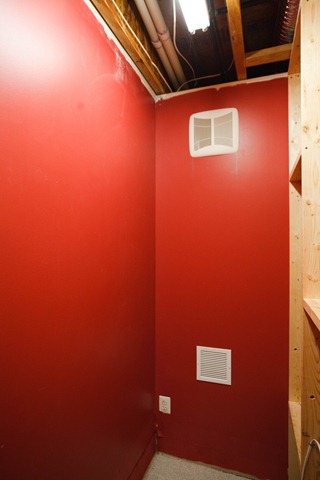
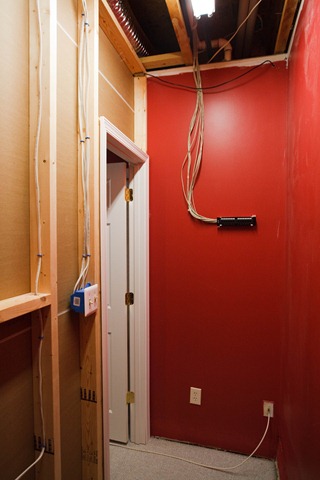
Upon arrival back from our trip to Houston, it was good to arrive back at the house to see that our basement work was complete. The wall was done and painted, the wall trim installed, and the door put in place.

201-3764

It looks like it was always there. Here are some pictures of the inside:

201-3767 201-3768

So, I’m pretty excited about the room. Tonight, I’ll be moving the servers into the room, so the site will be down for a bit.

Saved By The Elephant

I have a spreadsheet I keep on my laptop with which I keep track of my billable hours for work. The company has a tool, but I like to keep an independent check on it with my own records. Just in case, right? I click on the desktop shortcut I have setup for it and to my chagrin, it says “file not found”. This is not good. I search my laptop and sure enough, it’s gone.

All is not lost, however, since I have Windows Live Sync keeping copies of all my data from the laptop to a share on my server. Of course, the program works flawlessly by replicating the deletion and thereby removing the server copy of my file.

Not to worry, I think. I know that not too long ago, I set up Shadow Copies on the server, which keeps snapshots of changed files. The only problem with this is that it only goes back as far as when I turned it on, which was 2 weeks ago – AFTER the file in question had already been deleted.

My last hope: my online backup system – Elephant Drive. This, like Mozy and other online backup services, has a desktop client [or in my case a server client] that runs and copies files and changes up to the Internet for backup. This is exactly what happened shortly after July 2nd, which was the last time I changed this file.

A simple browse and right-click later, I was saving the file back into its old place on my laptop.

I like Elephant Drive for the main reason that all the other services wanted to charge me MUCH more money just to be able to install their client software on Windows Server. If I have a server, I must therefore be a business and be made of money or something. This is not the case – I’m just a geek with a server or 7 at home and want to keep all of my data and files in one place. So, for $4.95 per month, they let me run it.

It’s now proven its worth. While that particular file might not be worth the $35 I’ve spent so far, the experience I’ve just had certainly gives me a degree of comfort that my files are safe.

My recommendation to you is this: find a backup solution that works for you, but be sure to include automated off-site [or Internet] backup as part of it.

Email Is Back: With A Vengeance

After about 5 days without email, I was finally able to restore our email service – and even get us upgraded to Exchange Server 2010 Release Candidate. All it took was a complete destruction of the old Exchange environment (twice) and rebuilding from scratch. Good thing I was able to take a backup of the mailboxes!

So, if I hadn’t replied to you for a while, now you know why.

Additional Media Center Woes

Things were looking up with the media center now that I got the cable card tuner and a new video card. It was looking great, that is, until the technician left. It seems that Cox has implemented Switched Digital Video on their digital cable network. That totally broke my media center. I can get a few channels, but not a lot of the ones I regularly watch. So I’m stuck. Either I go for Fios which doesn’t do SDV, or I wait until someone (ATI) puts out a patch for my tuner that supports SDV and get a tuning resolver that it will work with on the Cox network.

I have decided to wait, really, since we’re doing a number of things and we still have the old DVR to fall back on until things get more settled around here and we can really think about what we want to do with the cable.

One day, this will work.

One day…

Media Center: Phase 2

I’m now beginning the second phase of the new media center effort. We’ve ordered two things: a cable card tuner and a new video card. We need the new video card to be able to view HDCP content, such as HD video from the tuners, and a future BluRay drive if we go that route. It also has an HDMI jack which will give us more vibrant color than the VGA jack we’re currently using.

Secondly, we’ll be making a trial run with a single digital tuner so that I can get the system running and make sure it works before ordering the second one.

If all goes according to plan, by next month I’ll have the second tuner and we’ll ditch the cable service provided DVR box and save even more money [we saved over $12 by getting rid of the upstairs cable receiver, and should save maybe $30 or so by getting rid of the HD DVR box set top box].

I’ll let you know how it pans out.

Database Migration

I know many of you won’t care too much about this, but I’ve migrated my web site photo gallery from MySQL to Microsoft SQL Server 2008. It’s now working on the new server. It was actually rather painstaking to get it set up correctly, but it’s done now.

The only thing you might miss is the links are kind of ugly now, not the neat links they used to be. I may be able to fix that in the future.

UPDATE: I fixed the links and they’re back to what they were.

Even More Fun With Windows Media Center

I mean it this time!

Previously, I had used our old [really only] desktop as a media center PC only to fall short of our goal. After you read that, you’ll find that I got to the point where everything was great – except for the digital encrypted channels… which was most of them. I had given up and just configured a virtual machine with an extender to play our music.

We almost never turn it on.

I had at one point subscribed to a discussion about media center and was still getting emails about it. The other day, I actually read a couple. What I read was liberating. Not in a metaphysical sense, but a technological one. In the previous post, you’ll note I discuss the fact that in order to get a CableCard tuner to work with a Windows Media Center PC, it needed to have special BIOS – and be blessed by the cable industry. While to some extent this is still true, some interesting things are happening.

First, new system boards are becoming available with the special setting enabled by default. That is great, since there was previously no way to buy special parts for those who wanted to build their own system or upgrade existing ones for lower costs. Secondly, there seems to be a “hack” out there, or more precisely a utility, which allows non-OCUR systems to show as compatible for CableCard tuners.

Guess which one I was leaning to?

Having already had a nice, capable system [4GB of RAM and 250GB HDD – possibly need more space, though] I was not really desirous of buying anything new. So, I took the old box, wiped it out and installed a fresh copy of Windows 7 RC1. Win7 is quite a bit better, I must say. Especially when it comes to Media Center. The TV Pack is included by default and it, while familiar, has a few more features. I then used a utility to check OCUR compliance: FAIL. Next, came the OCUR utility. I installed it and, Viola! PASS.

I finished building the system, including installing the Amazon Unbox player and the new beta version of the Hulu Desktop [quite cool, I might add] and customized it to be launched from inside the WMC GUI. It even uses the WMC remote control! That being done, I synchronized the music locally to the machine and took it upstairs. I hooked the old analog tuner into the computer and achieve low-def success.

Now that it’s working the way I want, the only thing left is for us to obtain a pair of CableCard tuners [I think Win7 Ultimate can handle up to 4] and cards and get them paired. I’m waiting on that because the tuners are still almost $300 a piece so that has to fit into my budget.

One thing is certain, though: the additional $40 or so per month I’m spending on cable boxes will go away once I go live with CableCards. I’ve even thought about cancelling cable. You can watch all you want on Hulu, so why do I need cable, right? Well, Laura says I can’t drop it yet and the Hulu shows aren’t in full HD and because they’re streaming tend to jump a little. So – not completely free of the cable company. Yet.

All I know for certain is that the saga will continue, and once I can save up enough for the tuners, we’ll be good to go… but…

I need to save up for a car too… decisions, decisions…

Imaging USA: Day 0

It hasn’t started yet, but we’re here in Phoenix and have done some early reconnaissance to find out where we should go, where to park, and how to get there. It looks like we will have to really push getting up early – the convention starts at 7AM. Luckily for us, that’s 7AM Arizona time – 2 hours earlier than where we come from [that’s actually 9AM “our” time].

We first found some things to eat [which of course is VERY important] and then headed to the downtown convention center. We walked around getting our bearings and then made a few more stops for groceries to keep in the room. We’re going to have to get up so early, that most breakfast places won’t be open, so we had to get our own to keep in our tiny little fridge.

I’ll try to post as the days go on about interesting things that may happen here – or I may collapse with exhaustion and not type a single additional word until we leave. I hope to get some great perspectives on running a photography business as well as some additional technical education on both photography and the tools associated with it.

None of this blogging or email would be possible without the help of my mother-in-law Norma. So, Thank You Norma! for staying up late and obtaining for me the decryption key for my laptop which failed to boot up properly on the first night here. She painstakingly read out the 400 digit code [not really, but it SEEMED like 400 digits] to unlock the machine so that I could boot into Vista. I have since turned off Bitlocker for the duration of the trip. I needed to anyway since I’m going to upgrade to Windows 7 Beta soon. I hear it’s much faster… 🙂

And I have to try out CS4 and Lightroom 2 on the next version of Windows!

Fun With Windows Media Center – An Epic Journey

It may not be quite "epic", but it has been quite a journey.

First, let me explain what Windows Media Center [let’s just say WMC from now on] is. WMC is an application that runs on Windows [for the sake of discussion, let’s keep it Vista specific] and allows you to host music, pictures, videos, TV, DVDs, radio, etc. on a computer which is connected to you home entertainment system [TV & stereo system usually].

As a small point of history, Laura and I have moved around a little in this area discovering the good/bad/ugly of the local cable systems and DirecTV. Not that DirecTV in and of itself is bad, but the outages during high winds and storms was unacceptable. We tried local cable: Comcast first and now Cox. Verizon Fios is out but not yet at our house. In the course of trying out the different cable systems and DVRs, we fast discovered that both cable system boxes are VERY bad. The Comcast box was better, but the guide was awful and had advertisements all over it. It was slow and never quite worked for On-Demand videos. The Cox  box works just fine – if  you like slow and non-responsive at times. However, the DVR portion of this box is absolutely horrible. There’s no "series priority" setting that the Comcast box had – in other words, you couldn’t program 3 shows to record at once [of course, since there are only 2 tuners] and have it chose the top 2 in case of a conflict in time. I can’t even view the list and settings of my scheduled recordings. I have to guess. Also: I can’t record a series with the settings: "all new shows on all channels". Even recording "all shows on this channel" isn’t smart enough to know that it has already recorded that episode – it records it anyway and fills up the disk.

So I thought I’d remedy the problem by using Laura’s "old" computer as a WMC station. By "old" I mean only a year old. The only newer computers in this house are the server and my work laptops – only 1 of them, actually. So it’s not really that old. It came with a tuner and has a 300GB hard drive which at first glance is enough to be a basic media center.

Configuring the basics of the WMC and connecting it to the TV/stereo was a joy: everything worked great. I had digital audio connections and a VGA jack right into the TV. It would have been better with HDMI I’m sure, but that would have been an upgrade at a later date when I found out if it worked like I wanted it to. The only initial problem was WiFi signal strength [don’t do this, by the way – go for wired connections] which I have now solved by using an Ethernet over power line adapter. The great thing about this is that I could now [once the network problems were solved] listen to all of our music CDs which I painstakingly ripped to MP3 over a series of months and stored on the server. Now, there is no need to dig through a box of disks searching for the right one. I just load up the music library and Boom! Tons of music. Success!

It also worked great for some downloaded episodes from Amazon Unbox – some NCIS or CSI episodes we missed and needed to catch up on played very well. DVDs played wonderfully as well, even transmitting digital surround signals to the amplifier [I don’t have all the speakers mounted yet, but will soon… I hope…].

Then came the big problem. The whole reason I started this journey [not the "whole" reason really – I did want to play our music and videos from the server as well…] was to eliminate both the extra cost and evil [yes, I mean "evil"] interface of the cable guide and DVR. If you’ve ever seen the interface of WMC, it’s really slick. I’m not just saying that out of loyalty, but out of experience. The WMC interface is quick, intuitive, and very pretty. It makes the cable box interfaces look like 80s video games… like "pong" or "Space Invaders" instead of "Halo".

So – what’s the problem with that, you ask? Well, the tuner. Yes. The tuner. The system itself ROCKS. As far as analog cable shows go, it’s the system to have… if you have only analog cable. Digital cable is another story altogether. I found that my tuner would only work with analog signals and over-the-air HDTV signals. Anyone who lives in a hilly or mountainous area will immediately recognize the flaws with that. Right – over the air in Virginia? Not. In Houston, I know this is not only possible but works quite well. It just doesn’t work for me. So I tried another tack: many cable companies will send digital channels over "clear QAM" or unencrypted digital signals over the cable. My card didn’t support this, so I picked up one at a nearby store and tried it out.

Success! I could now view digital channels… but… wait… only 13? I thought I was paying for 150 or so. Where’s all the other channels? It seems that only local broadcast channels are sent in the "clear". All the others are encrypted. What should I do? After some research, I discovered that there is a system that will support this called CableCard. This is a method by which encrypted signals are decoded and able to be played by a media system or even TV which has this capability. I thought I’d found the solution.

The more I read, though, the more disappointed I became. CableCard tuners only seemed to work on pre-configured systems with special BIOS that would support them. What this means in English is that in order for me to get the channels that I wanted on my WMC PC, I would need to spend about $1500 or more on a new computer just to escape the ugly interface and clunky DVR. I wasn’t ready to do that. I am glad I didn’t buy the tuners – returning them would have been a pain. So I was stuck. Well, not only stuck, but I found out that Cable Labs who makes these "standards" for the cable industry keeps changing things. There’s now a new standard for bi-direction digital cable encryption/decryption that cable companies will be utilizing, thereby obsoleting any system that I would have purchased or configured.

The conclusion of this story is that I have relocated Laura’s computer back to the basement, created a virtual desktop running Vista, installed WMC, created a local copy [which is synchronized via Live Sync] of all of our music, and connected a Media Center Extender to the stereo and TV which now lets us play our music and videos on the main entertainment system.

Oh – and that now includes a Blu-Ray player which I had intended to add into the WMC computer.

I’m not giving up, though. Verizon Fios will be coming soon and their DVR system and cable box is based on Windows CE and a custom version of what looks a lot like WMC.

Maybe one day, cable companies will do something smart… or helpful… or maybe not.

One can hope, yes?